YouTube subtitle downloader
A script with a UI to download the subtitles of an entire channel at once.
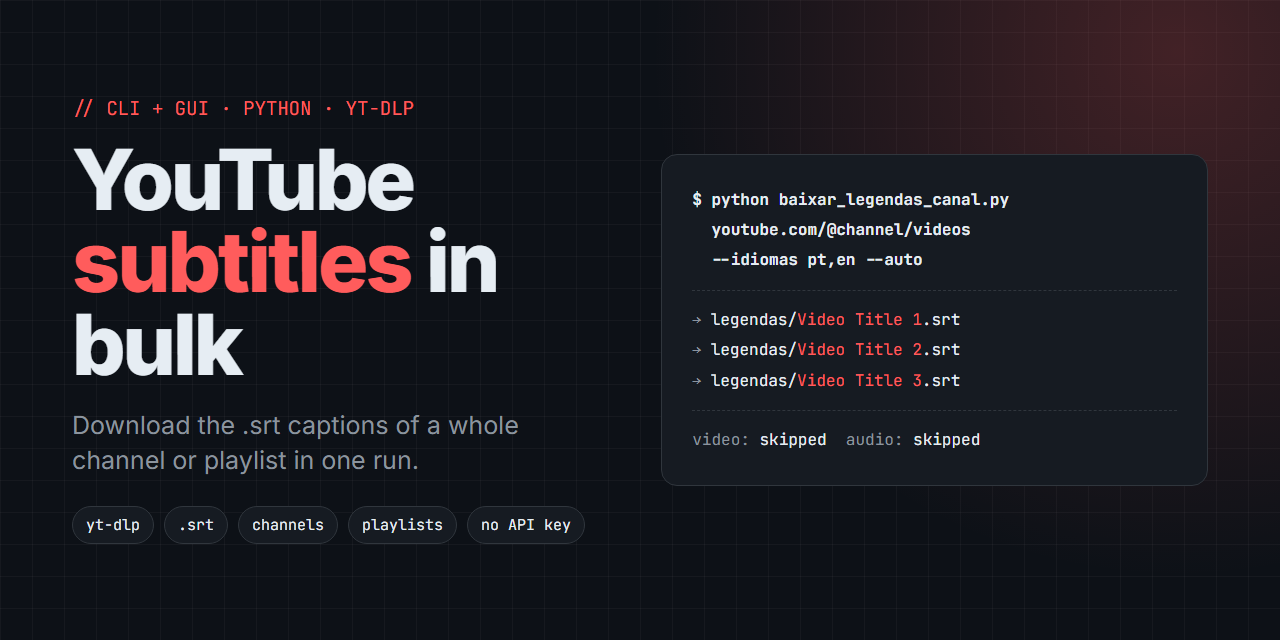
Baixar Legendas YouTube is a Python command-line script with an optional desktop GUI that downloads the .srt subtitles of a single video, a whole YouTube channel, a playlist or a pasted list of URLs in one run, built on yt-dlp and pywebview, with no YouTube API key required.
YouTube has no built-in way to grab every subtitle from a channel or playlist at once, and downloading them video by video is slow. This tool hands the URLs to yt-dlp, skips the video and audio, and saves only the captions.
YouTube subtitle downloader · download YouTube captions · bulk SRT download · channel transcripts · playlist subtitles · yt-dlp subtitles · auto-generated captions
Features
- Video, channel or playlist. Pass any mix of URLs. yt-dlp expands channels (
.../videos) and playlists to every video. - SRT output. Subtitles are converted to
.srtwith ffmpeg. - Language choice. Defaults to
pt,pt-BR,en; pass any comma-separated list. - Auto-generated captions. The optional
--autoflag includes YouTube automatic captions. - Keeps going on errors. A video with no subtitle in the requested languages is skipped and the rest continue.
- Subtitles only. It never downloads video or audio.
- Optional GUI. A small pywebview window with a URL box, language field, folder picker, auto-caption checkbox and a live log.
Tech stack
| Technology | Version | Used for |
|---|---|---|
| Python | 3.9+ | Runtime (the code uses list[str] type hints, which need 3.9+) |
| yt-dlp | unpinned in requirements.txt |
Fetching and downloading subtitles |
| pywebview | unpinned in requirements.txt |
Native window for the optional GUI (gui.py) |
| pythonnet | unpinned; installed only when sys_platform == "win32" |
pywebview backend on Windows |
| ffmpeg | external, not a Python package | Converts subtitles to .srt |
Getting started
Requirements: Python 3.9 or newer, and ffmpeg on your PATH.
git clone https://github.com/WednyFernandes/baixar-legendas-youtube.git
cd baixar-legendas-youtube
pip install -r requirements.txt
Usage
Command line
python baixar_legendas_canal.py https://www.youtube.com/@channel/videosIt accepts a video, a channel or a playlist, alone or combined:
python baixar_legendas_canal.py https://www.youtube.com/watch?v=XXXX
python baixar_legendas_canal.py URL1 URL2 URL3
python baixar_legendas_canal.py URL --idiomas en,es --saida subs --auto
Files are saved as <output folder>/<video title>.srt.
| Argument | Default | Description |
|---|---|---|
urls |
required | One or more URLs: video, channel (.../videos) or playlist |
--idiomas |
pt,pt-BR,en |
Subtitle languages, comma-separated |
--saida |
legendas |
Output folder for the .srt files |
--auto |
off | Include auto-generated subtitles when no manual one exists |
Desktop GUI
python gui.pyPaste one URL per line (video, channel, playlist or a mixed list), set the languages and output folder, tick the auto-caption box if needed, and start. The log shows a Baixado: <file> (downloaded) line per subtitle and Concluido. (done) at the end.
How it works
The script calls yt_dlp directly and passes the list of URLs to ydl.download(urls). yt-dlp detects whether each URL is a video, a channel or a playlist and expands it, so all cases share one code path. It runs with skip_download=True and writesubtitles=True (plus writeautomaticsub when --auto is on), and converts the result to .srt through the FFmpegSubtitlesConvertor post-processor. ignoreerrors=True makes it skip videos without a matching subtitle. The GUI (gui.py) calls the same functions (baixar_legendas, parse_urls) on a background thread and streams the log to the window.
Project structure
baixar_legendas_canal.py   # CLI: parses arguments and runs the download via yt-dlp
gui.py                     # pywebview window that calls the same functions as the CLI
gui.html                   # GUI markup (HTML + Tailwind via CDN)
requirements.txt           # Python dependencies
FAQ
Do I need a YouTube API key? No. yt-dlp reads the public subtitle tracks directly.
Can I download the subtitles of an entire YouTube channel?
Yes. Pass the channel videos URL, for example https://www.youtube.com/@channel/videos, and every video with a subtitle in your chosen languages is saved.
Why is a video missing from the output folder?
It had no subtitle in the requested languages. Add more languages with --idiomas, or use --auto to include auto-generated captions.
Does it download the video too? No. It only saves the subtitle files.